Adjusting Custom Curve for ETTR Footage

Cullen Kelly has contributed a tutorial entitled How to Fix the Dreaded “Video Look” Using DaVinci Resolve to the Frame.io Insider blog where he shares several tips that we've used with great success since following him on his YouTube channel Grade School; but we advise against making an S-Curve as he recommends if you're exposing to the... Continue Reading →

DaVinci Resolve 18.5 Public Beta Color Page Additions

Per-Timeline Resolve Color Management Timelines using custom settings now allow you to override color management settings on a per timeline basis. This allows setting of independent timeline and output color spaces per timeline along with other color management properties. Any existing custom timelines are automatically initialized to color management settings from the project. Set Composite... Continue Reading →

Sony Color Management Updates

Here are the revised settings for Sony S-Gamut3.Cine/S-Log3 and ProRes 4444 XQ Rec.2100 ST2084 (from ProRes RAW), the chief difference being no more input or output DRT. Only restrict output color space to P3-D65 if the mastering display is calibrated to P3. Set 'HDR mastering is for' according to the capabilities of the mastering display.

We Need Your Feedback!

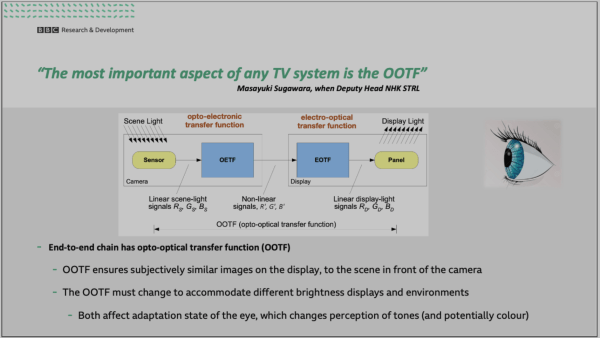
The job of color management is to take what the camera saw and transform it into what the display can show. That's Cullen Kelly's definition of color management. And when we perform what is one of the most basic types of color management - simply placing a single CST at the very end of our... Continue Reading →

Scene Referred vs. Display Referred Part II

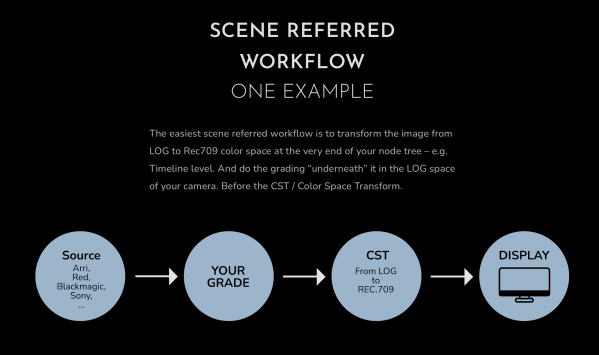
What's the difference between scene-referred and display-referred grading? Stefan Ringelschwandtner, on his website Mononodes, explains it very clearly with simple diagrams. He writes: "The easiest scene referred workflow is to transform the image from LOG to Rec709 color space at the very end of your node tree – e.g. Timeline level. And do the grading... Continue Reading →

DaVinci Wide Gamut Or Native Color Space?

When it comes to post-processing, using the fewest number of transforms and working at the highest available bit depth in a native color space greater than the display color space are key to preserving the greatest image quality. So, should you be changing your timeline color space to DaVinci Wide Gamut Intermediate or not? To... Continue Reading →

A Few More Changes to Komodo Post Workflow

We've made a few more changes to the RED Komodo post-workflow, including adding Rec.2020 ST2084 (P3-D65 Limited) for those working with a display calibrated to P3-D65, such as the MBP (2021). From the DaVinci Resolve user manual: Gamut Limiter Lets you limit the gamut to a specified standard. Useful in situations where the delivery color... Continue Reading →

RED Komodo Grade Reveal

The clip incorporates many of the techniques discussed in our Monster guide - the most comprehensive and up-to-date free resource on the Internet for HDR10 workflows in DaVinci Resolve Studio 18 that shows how to use false color to nail exposure every time; how to use HSL to selectively target problematic areas for the best... Continue Reading →

Blog at WordPress.com.

Up ↑