
“The series is worth a watch if you want to know more about HDR workflows.”
—Matthew Allard, ACS
Doug Guerra, a prolific video producer for B&H Photo, hosted a two-part series introducing HDR workflows that contains countless serious errors.
Misunderstanding PQ
CLAIM
“HDR10 uses a standard known as ST 2084 or Rec. 2100. They are synonymous.”
FACT CHECK
ST 2084 ≠ BT.2100.
- SMPTE ST 2084 is the Perceptual Quantizer (PQ) EOTF.
- ITU-R BT.2100 is the ITU-R standard for UHDTV (HDR/WCG) specifying—among other things—BT.2020 primaries, D65 white point, and the PQ and HLG transfer functions.
CLAIM
“HDR10 is, technically speaking, sent in the form of a log image. If you view it on a regular screen, it will look grey and flat, like a log image from a camera.”
FACT CHECK
No. HDR10 is not sent as a log image. Any footage viewed without the appropriate display transform will look incorrect. That doesn’t make the encoded signal “log.”
CLAIM
“PQ, which is the HDR10 format, the standard format anyway, expects a log image. It is a log format in a way.”
FACT CHECK
Like many of the statements, this one’s tricky to pin down because it’s incoherent. Is he claiming PQ is a log format? That HDR10 is a log format? Either way, it’s false. PQ is PQ. Log is log. They’re not the same thing.
SMPTE ST 2084 ≠ log
ST 2084 is the Perceptual Quantizer based on the Barten contrast sensitivity model, developed by Dolby to replace conventional gamma encoding, and published by SMPTE as ST 2084 in 2014.
Conventional logarithmic encoding wastes code values where they aren’t needed. PQ uses them efficiently by tracking the Barten Ramp across the HDR luminance range.
PQ ≠ ‘HDR10 format’.
HDR10 is an HDR format. PQ (SMPTE ST 2084) is the transfer function used by that format.
CLAIM
“Essentially, we’re converting it from one log format to another.”
FACT CHECK
Mastering HDR10 is not the process of converting from one log format to another.
You’re converting from a timeline color space (e.g., the camera native logarithmic color space or DaVinci Wide Gamut/DaVinci Intermediate) to a display-referred output (e.g., BT.2020/PQ).
CLAIM
“And since we’re viewing log footage—this is Canon C-Log2 right here—it kind of already applies an HDR look to it in the sense that it’s scaling it, but incorrectly, across the monitor’s brightness.”
FACT CHECK
Log does not apply an ‘HDR look’ to footage.
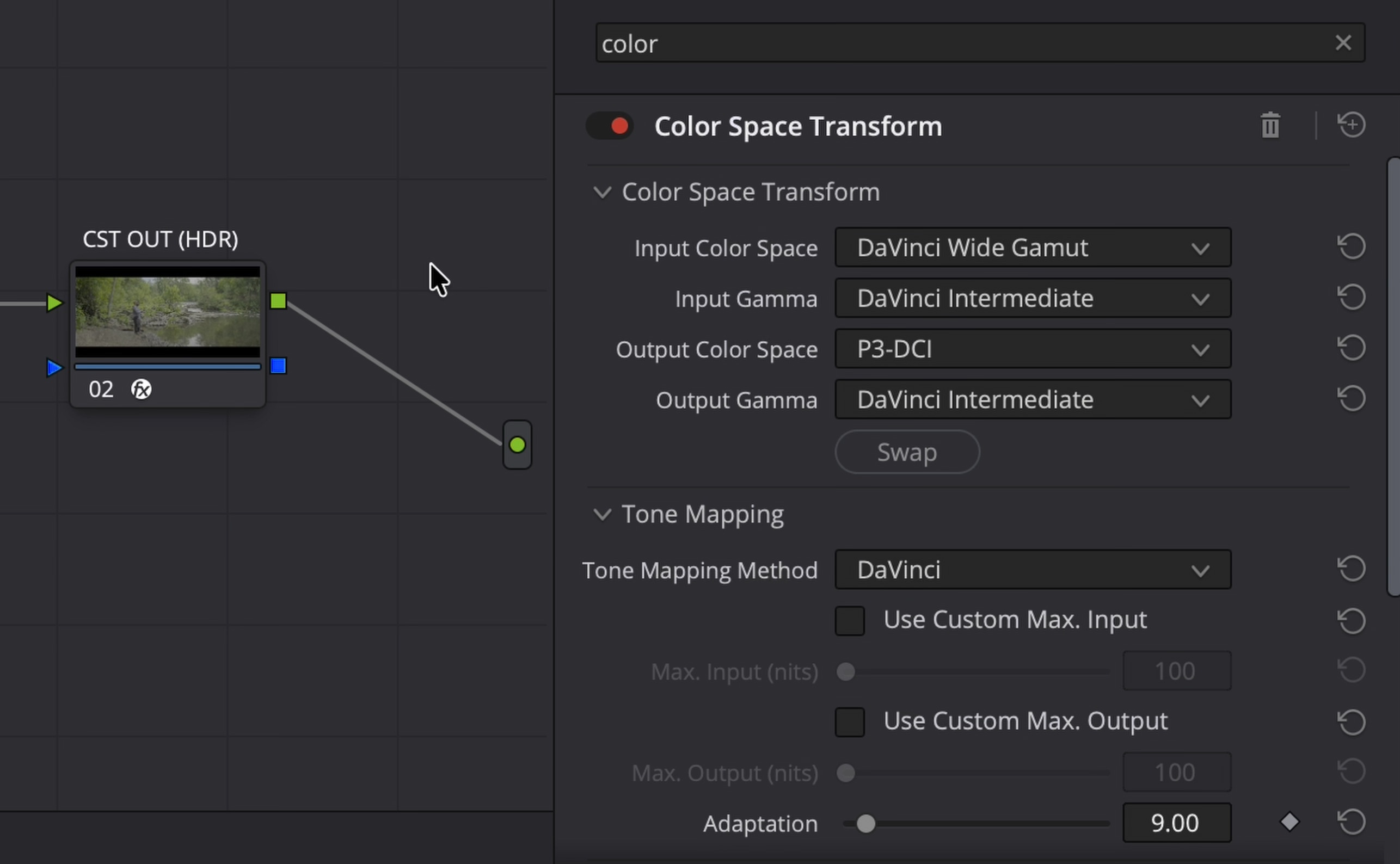
Technical Notes
P3-DCI ≠ P3-D65
DCI-P3
- White point: ≈ 6300 K
- Gamma: 2.6
- Designed for digital cinema projection
P3-D65
- White Point: ≈ 6500 K
- Commonly used with PQ for HDR mastering
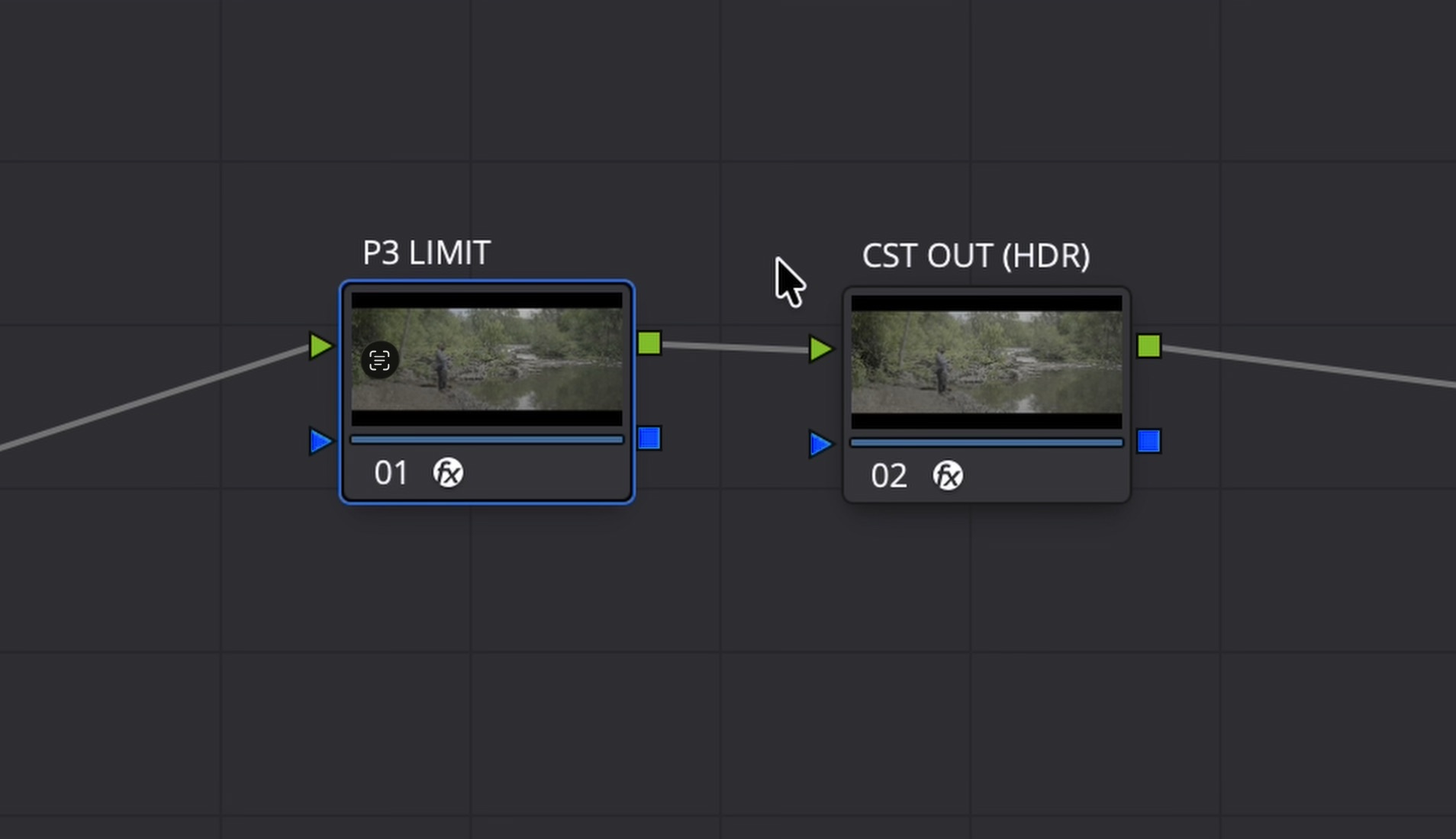
Node Tree Chaos
In the video, a ‘P3 LIMIT’ node is followed by a ‘CST OUT (HDR)’ node. Both use a CST. Neither is correct.
‘P3 LIMIT’
- Input Color Space: DaVinci Wide Gamut
- Input Gamma: DaVinci Intermediate
- Output Color Space: P3-DCI
- Output Gamma: DaVinci Intermediate
‘CST OUT HDR’
- Input Color Space: P3-DCI
- Input Gamma: DaVinci Intermediate
- Output Color Space: Rec. 2100
- Output Gamma: Rec. 2100 ST 2084 (scene)
Gamut Limiter
1. A P3-DCI CST followed by a BT.2020 CST does not limit the gamut to P3.
2. A BT.2020 CST followed by a P3-D65 Gamut Limiter will constrain the color gamut to P3 within the BT.2020 container.
Sources
Doug Guerra, Everything You Need to Know About HDR Video, Part 1: The Basics, B&H Photo Video Pro Audio YouTube channel, Aug. 14, 2026
Doug Guerra, Everything You Need to Know About HDR Video, Part 2: Color Grading, B&H Photo Video Pro Audio YouTube channel, Aug. 21, 2026


And white in slides/screenshots he inserted and most of the text is at 1000 nits.
I downloaded yt video to check becuse it was painful literaly, full screen at 1000 nits