
Part I: The State of HDR Film Emulation LUTs
Part II: Moving Beyond Traditional Film Print Emulation
Part III: Negative and Print Clarified
The final fundamental to grading photographically is to use a good print stock. This concept is largely forgotten today but for a century or more, print stock played a key role in defining the look of a film, providing a consistent baseline of creative contrast and color imagery and helping visually unify the images. – Cullen Kelly
While there are countless LUTs on the Internet, precious few are compatible with an HDR workflow. Colourlab.Ai‘s Look Designer LUT portfolio has been available for three years running. We had a chance to play around with it a bit and the results looked promising, though it was exceedingly difficult to deal with the contrast and the prominent watermark on the trial version meant we could only work with it for a few seconds for fear of ruining our display. There’s also Cullen Kelly’s Colloid, his version of what an ideal film stock would be like. We tried it out briefly and were pleased with it, if not overwhelmed. The plugin is simply not nearly as feature-rich as the others, some of which offer dozens of film emulations, in addition to grain, halation, bloom, gate weave and so on. Unfortunately, we didn’t spend enough time with Colloid to determine how it transforms other colors aside from skin tones – something we hope to rectify very soon. If proper color management, working scene-referred or HDR are important to you, steer clear of the Dehancer plugin. For starters, it is limited to the Rec.709 color space. Below is a glance at the various developers’ products.
DaVinci Resolve Film Look Creator
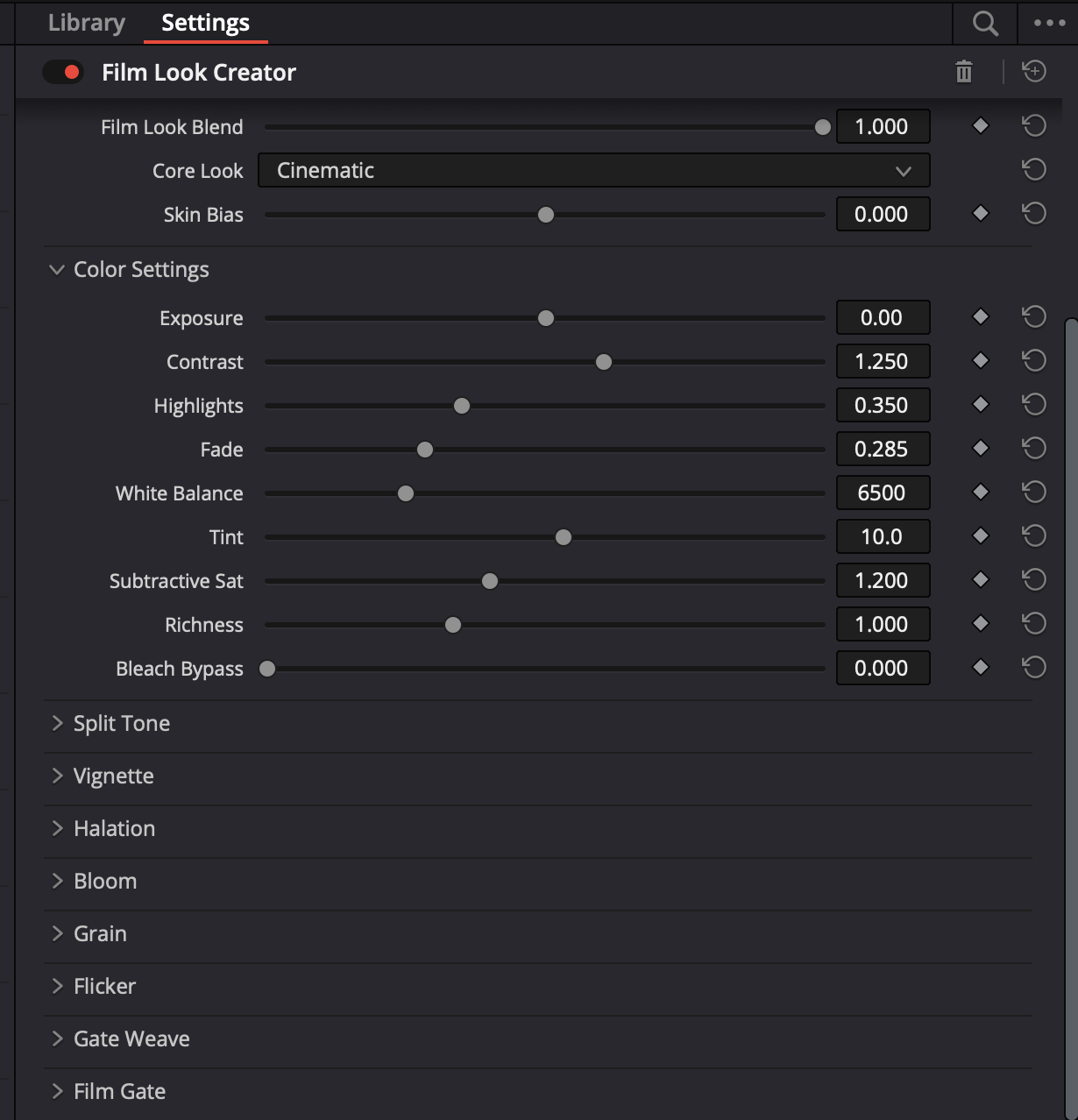
DaVinci Resolve 19 introduced the Film Look Creator that lets you add cinematic looks that replicate film properties like halation, bloom, grain, flicker, gate weave and vignetting.
Colourlab.Ai
Colourlab.Ai’s Look Designer 2.0, a plugin for DaVinci Resolve, features a very deep collection of film emulation LUTs and works on macOS, Windows and Linux. A few of the many print stocks available include: Fuji CP 3510, Fuji Eterna CI 8503, Kodak Vision Color Print 2383 and Kodak Vision Color Print 2393. Negative stocks include Agfa XT 125, Fuji Eterna 8543 Vivid, Fuji Reala 8592, Kodak 5203 Vision 3 50D, Kodak Ektachrome 7294 Reversal and Kodak Kodachrome 40 7268. A tutorial explaining how to use Colourlab’s LUTs can be found here. Descriptions of the many film stocks, along with titles of some of the feature films shot on them, can be found here. Unfortunately, the trial version has gargantuan watermarks, rendering it fairly useless. The subscription service runs USD $24/month or $249/year. Try out the free trial version here.
Update, 22.02.2022: Release of public beta of version 2.0 with several new features, a new user interface, support for Adobe Premiere and Final Cut Pro, optimization for Apple silicon and new pricing.
New features include:
- Ai Powered Auto Color
- Color Tune
- Show Look Library
- Smart LUTs
- Improved Camera Matching
Perhaps the biggest practical consequence of film versus digital capture is on the aesthetics of our captured image. Digital sensors are designed to accurately capture raw image data and they’re getting better and better at this all the time. Film has a fundamentally different design: it imparts aesthetics on our image that were not present in the original measurable light of the scene. Why is this? First, because film is an imperfect analog format and in fact, a lot of the qualities that we associate with film, that we find desirable about film – like grain and halation and gate weave – are technically imperfections in this analog system. Second, film is engineered to do more than to give you a neutral, accurate capture of your scene data. It’s trying to enhance the color of your image, and after nearly a century of engineering, it does a damn good job of it. So, if we choose to shoot digital, does this mean that we’re forever barred from the aesthetics of film negative? Absolutely not! All the qualities that I’m talking about can be measured, modeled and reproduced digitally. What it does mean is that it’s on us to do this and of course to do it well.
– Cullen Kelly
Colloid 2.0
Colloid 2.0 has been overhauled with a streamlined UI for more intuitive and precise control and faster performance and features next-gen synthetic print stocks purpose-built for HDR and wide gamuts. It’s compatible with DaVinci Resolve Studio 17 and later and boasts native support for Davinci Wide Gamut, ACES, RED IPP2, Arri LogC, and film scans. There is a free 7-day trial, including for users who’ve tried previous versions. The Master Bundle consists of all Colloid tools: Print, Exposure, Points, Contrast Plus and Saturation Plus and download includes five user-adjustable DaVinci Resolve OpenFX DCTLs with automatic installer, PowerGrades for recommended node tree and free product updates for the life of the subscription. There is no renewal commitment – you may cancel your subscription at any time. A monthly subscription runs $99.00, quarterly is $249.00 and yearly is $899.00. If that sounds extortionate, Cullen Kelly’s color grading tutorials will help up your game even without any plugins or LUTs.
Note 27.12.2022 Colloid has been discontinued.

Update, 01.01.2022: This is absolutely massive! Cullen Kelly has released a FREE Kodak 2383 print film emulation LUT that works in both ACES and in DaVinci Wide Gamut as well as in SDR or HDR. We tried it on some clips and it’s the real deal! Head on over to his website and pick yours up now.
Core Elements Creative LUT Pack
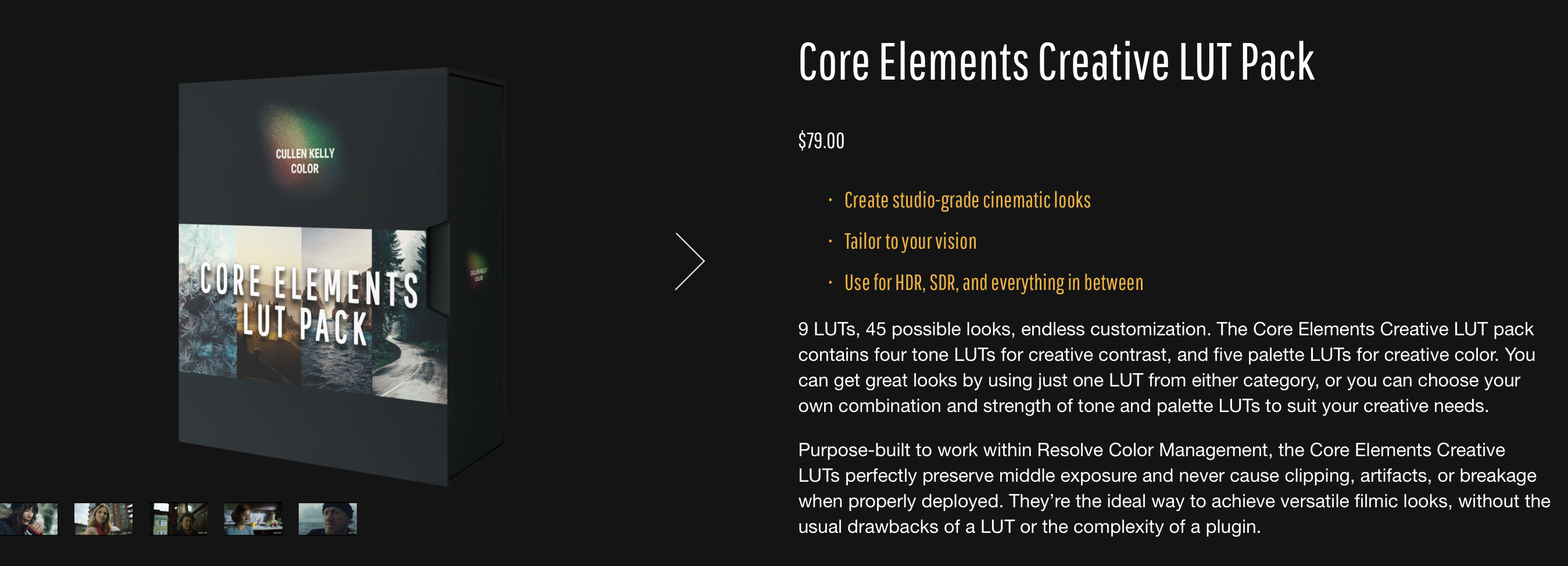
Cullen Kelly has just announced the release of a new LUT pack that is compatible with an HDR workflow. From his website:
- Create studio-grade cinematic looks
- Tailor to your vision
- Use for HDR, SDR, and everything in between
9 LUTs, 45 possible looks, endless customization. The Core Elements Creative LUT pack contains four tone LUTs for creative contrast, and five palette LUTs for creative color. You can get great looks by using just one LUT from either category, or you can choose your own combination and strength of tone and palette LUTs to suit your creative needs. The Core Elements Creative LUT pack sells for just $79.00.
Note: The Core Elements LUT Pack is no longer available.
The Voyager LUT Pack

Cullen Kelly released the Voyager LUT pack at the start of 2023. The Essentials pack sells for $79.00 and includes the following:
- The 17 core Voyager LUTs to grade faster and deliver high-end work on any job
- Color Grading Mini-Course so you can make stunning images out of anything you’re grading with
- “Tasting Notes” .pdf with detailed instructions on how to install your LUTs alongside descriptions of what each LUT does and recommended ways to use them
The Pro version goes for $129 and includes:
- Everything in the Essentials Pack
- 24 additional Look Design components to create the exact look you and your client wants quickly and easily on any project
- PowerGrade versions of all 17 Voyager LUTs, revealing exactly how I used the Pro Pack pieces to build the Voyager set

Cullen Kelly’s offering a free Fuji 3510 film emulation LUT for use with ACES and DaVinci Wide Gamut. We can’t honestly say we’re really fond of the flat, yellowish-green look, but it might work for one of your projects – and free HDR compatible LUTs aren’t exactly falling out of the sky!
philmColor R3
From Phil Holland’s website:
What is philmColorR3?
philmColor is an expansive collection of LUTs built around the RED IPP2 Color Workflow. The LUTs range from creative looks to useful tools for colorists in post. It’s been a journey since the last release in 2017. Thousands of productions have used these LUTs on set, in post, and I’ve loved seeing the BTS grabs of the LUTs loaded on set. philmColor’s success has allowed me invest a lot of time into people’s requests, project looks, and more. A great deal of testing by individuals, studios, and productions commenced as well as creating more looks for my own projects. This led to an opportunity to even create the small selection of LUTs you get inside RED’s new DSMC3 cameras. But I assure you that is merely a taste of the feast I’ve included in PCR3. While the LUTs have been optimized for RED’s IPP2 color pipeline with REDWideGamutRGB/Log3G10, they are also compatible with many other cameras via the Color Grading Workflow. The new release includes 540 LUTs across 15 categories which can be used individually or combined. philmColor R3 is compatible with HDR workflows and costs $300.00.
RED IPP2 Creative LUTs
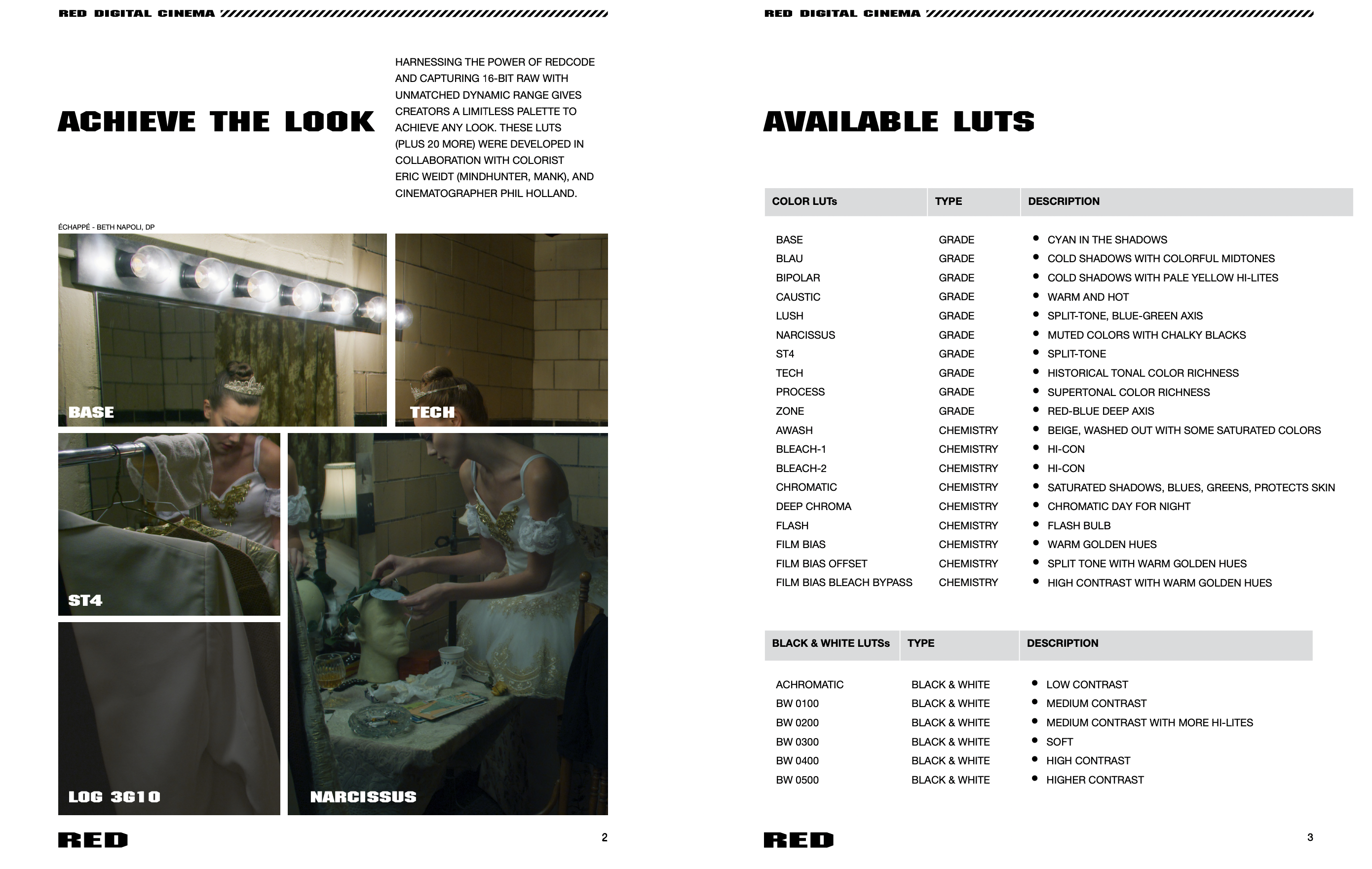
The RED Creative LUT Kit, developed by Phil Holland and Eric Weidt (David Fincher’s favorite colorist), features a number of interesting looks and should be compatible with most NLEs. The download pack is entirely free and the LUTs may also be copied to a CFast card and imported into the RED Komodo. Because they contain no conversion of color space or linearity, the LUTs can be used in both SDR and HDR workflows and, as they were tailor made for IPP2, unlike some LUTs and plugins we’ve tried, they do not pile on a truckload of contrast and saturation. Unfortunately, with the RED Komodo, it is not possible to use the same LUT to monitor in SDR on your smartphone while sending an HDR signal out over HD-SDI to your HDR monitor. Get your free LUTs here.
Ravengrade Film Emulations, Looks & Tools Plugin

The list of HDR WCG compatible film emulation LUTs and plugins is steadily growing, the most notable recent entry being Ravengrade from Lowepost, a DaVinci Resolve plugin created by an impressive roster of color scientists and colorists, including Mitch Bogdanowicz, Juan I. Cabrera, John Daro, Douglas Delaney, Florian Utsi Martin, Mark Todd Osborne and Bianca Rudolph.
First, the downsides: not all of Ravengrade’s products are HDR compatible, customer support is poor, there’s no trial version, sample footage and reviews are practically non-existent and documentation is rudimentary. On the plus side, the credentials of the creators are remarkable, several of the looks are said to have been used on a number of high-end productions, the plugin is uncomplicated to use but has a wealth of sliders in the control panel to achieve the desired look and there are three color management configurations available: rec.709, which lets Ravengrade handle it for you, RCM or ACES. And perhaps most importantly, the Standard version is not going to cost one of your kidneys.
The Standard version, which includes the Cinelook Plugin and Mira PowerGrades, features free updates, free support and is compatible with Mac, Win and Linux runs $129 per user, with renewals costing $69/year. The Complete package includes CineLook, Daro Cinema Looks, MIRA, and Master Tone, a plugin with tone curve adjustments, features access to future product releases, free updates, Mac, Win and Linux compatibility and free support and runs $249 per user, with renewals for $129/year.
Edit: Ravengrade’s products are no longer subscription-based. Check their website for current pricing.
Sony Venice 2 LUT Pack

Sony has teamed up with some heavy hitters – Josh Pines (Titanic, Saving Private Ryan, The Revenant), Chris Kutcka (Kill Bill, Pirates of the Caribbean), Jason Fabbro (Captain Marvel, Thor: Ragnorak, Ready Player One) and Tony D’Amore (Fargo, Elementary, Daredevil, Mayans MC) – to create a series of custom LUTs for their flagship cinema camera, the Venice 2. The LUTs can be used with any Sony camera that records S-Log3/S-Gamut3.Cine and those created by Josh Pines are available in both rec.709 and (gasp!) HDR rec.2020 PQ flavors. Best of all, they’re free.
ARRI Look Library
The ARRI Look Library for LogC4, designed for footage shot with the Alexa 35, consists of over six dozen different log-to-log 3D LUTs for post-production. They’re free and may be downloaded here.
A note regarding 3D LUTs for HDR BT.2100 PQ
In order to achieve a comparably error-free 3D-LUT to those used for SDR, a LUT size larger than 55x55x55 is required for 12-bit HDR (Rec.2020 ST2084). Most LUTs are 33x33x33 and the only camera we’re aware of that accepts 65x65x65 3D LUTs is the Arri Alexa 35. 65x65x65 3D LUTs can be created inside REDCINE-X Pro.
“In 10-bit SDR, in order to achieve unnoticeable interpolation errors using the trilinear interpolation method, a 3D-LUT larger than 41×41×41 is necessary. However, using tetrahedral interpolation a 31×31×31 3D-LUT is sufficient. In 12-bit HDR, in order to achieve unnoticeable interpolation errors, a 3D-LUT larger than 72×72×72, is required while a 3D-LUT size of 55×55×55 is sufficient if using the tetrahedral interpolation. The saturated and dark images resulted in a much larger minimum size 3D-LUT to achieve a JND<1 pointing to the possibility that ICtCp is likely not suited for dark images. Further studies are needed with emerging new color difference metrics to evaluate the 3D-LUT size for these types of images. Finally, we determined that reducing the bit-depth from 12-bit to 10-bit will require a 3D-LUT 50% larger on average to maintain a comparable image quality.” – A survey on 3D-LUT performance in 10-bit and 12-bit HDR BT.2100 PQ, JD Vandenberg, Stefano Andriani, SMPTE, 2018
Part I: The State of HDR Film Emulation LUTs
Part II: Moving Beyond Traditional Film Print Emulation
Part III: Negative and Print Clarified
 The Daejeon Chronicles
Nice article about the current LUTs market.
Thanks, Val. I’m seriously considering purchasing Colourlab’s Look Designer just so I can upload samples to YouTube. Haven’t been able to shoot any models since Vietnam’s been in lockdown.
Have you already tried PhilColor R3 LUTs?
It has been designed for Red Cameras workflow but it can also be used with other manufacturers like Sony, Canon, Fuji and Nikon.
It could be interesting but so expensive!
I haven’t tried philmColor yet, I’m just playing around with the LUTs built into the Komodo to see which ones I like best.
Of course, all the LUTs of Red already a great source.
I just downloaded the samples and tried some (REC709 however).
It seems great.